 Documentation


Working with PostgreSQL Publications
In Database Tour, you can configure logical replication between two PostgreSQL databases. For that, you need to create publication objects(s) in the source database, and subscription object(s) on the target side.
To work with publications in PostgreSQL database, use the corresponding tab of the Object Browser.
Creating Publications
You have two ways of creating a publication in Database Tour:
- Use specific interface. Switch to Publications tab of the Object Browser and click New button
 . A new window will be opened with publication options:

In the General tab, specify the publication name. The current user will be the owner of the publication; you can change the owner later by editing (altering) the publication (see below).
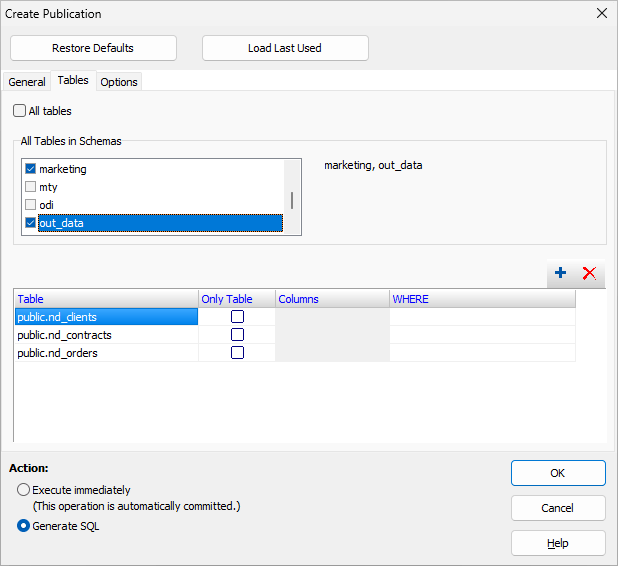
In the Tables tab, specify the tables to publish. There are several blocks here:
- All tables - Turn this option on to publish all regular tables from the database.
- All Tables in Schemas - Choose schemas from which to publish all tables. This option is available starting from PostgreSQL v.15.
- <Table List> - Choose individual tables to publish. For each table, specify the table name and the following optional attributes:
- Only Table - Turn on this flag to publish the specified table only; otherwise, this table and all its descendant tables (if any) will be published.
- Columns - Specify individual columns to publish (available starting from PostgreSQL v.15). If you need to publish all columns, leave this attribute empty. This attribute is not available if you choose schemas to publish.
- WHERE - Specify a condition to filter the table rows (available starting from PostgreSQL v.15). If you need to replicate all rows, leave this attribute empty.
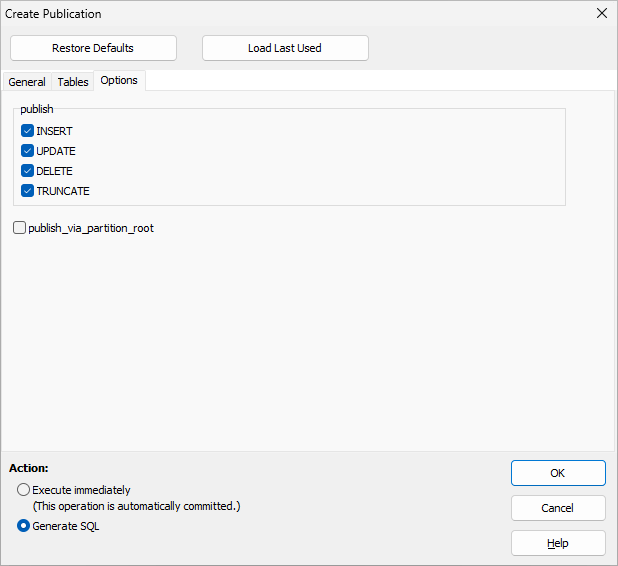
In the Options tab, specify the publishing options. Read PostgreSQL documentation to get more details.
To reset settings, click Restore Defaults button.
If there were already publications created or their SQL code generated in this application instance since the database was connected, you can quickly load the last used settings by clicking Load Last Used button.
Finally, choose either to generate SQL code for the publication or execute the generated code immediately and create the publication.
- Use SQL. Click New SQL Window button
 , or choose Query | New... menu, or press Ctrl+Q. The new SQL editor will be opened where you can write and execute the CREATE PUBLICATION command. Complete the command code and click Execute button
  .
.
Notes
- For both ways, it is recommended to read the PostgreSQL documentation for better understanding publication options and SQL syntax (if you choose SQL).
- After executing your SQL code, if you work in the no auto-commit mode, finish the transaction by clicking Commit button.
Deleting Publications
To delete (drop) a publication, select the needed object in the list of publications and click Delete button.
To delete several publications, right-click the list and choose Multiple Selection. Then select needed publications and click Delete button.
Hint: Publications can also be deleted by the SQL DROP PUBLICATION command.
Opening Existing Publications
Switch to the corresponding tab of the Object Browser. Locate the needed publication and select it. This will open a new sub-window displaying the object's properties. Switch to the Script tab to view the DDL code.
Hint: If you double-click the object name in the list, the sub-window will be opened with the Script tab activated.
Editing Publications
Open the needed object (see above) and use the Utilities button  on the General tab of the Publication sub-window. Here, there are several menu items to edit the publication:
- Edit... - Edit the publication in the interface similar to creating publications (see above); to access this menu item faster, double-click the grid on the General tab; if you choose to generate SQL code for the publication here, only the necessary commands corresponding to your changes in the interface will be generated;
- Add Tables... - Add tables to the publication in a short version of the above-mentioned interface;
- Remove Tables... - Remove tables from the publication in a short version of the above-mentioned interface.
- Edit Tables... - Add or remove publication tables and/or edit their columns in a short version of the above-mentioned interface.
Hint: Publications can also be modified by the SQL ALTER PUBLICATION command according to PostgreSQL documentation.
Cloning Publications
To clone a publication, select the needed publication in the list of publications and click Duplicate button above the list. Choose the name for the new publication. Optionally, modify some original attributes if needed. You can either create the new object immediately, or generate SQL code for that.
See also